
How to Generate QR Codes & PIN Codes
Edited
QR codes and PIN codes offer quick, secure, and contactless sign-in and sign-out options for participants, staff, and visitors using the StoriiCare Register App or register.storii.com.
Steps to Generate QR or PIN Codes
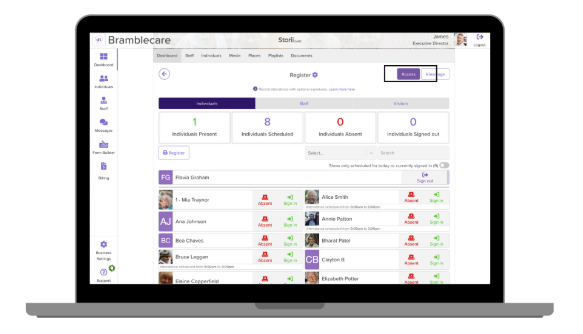
Go to the Register:
From your Dashboard, click Register.
Select the User Type:
Choose Participants, Staff, or Visitors tab.
Click ‘Access’:
Located in the top-right corner of the Register screen.
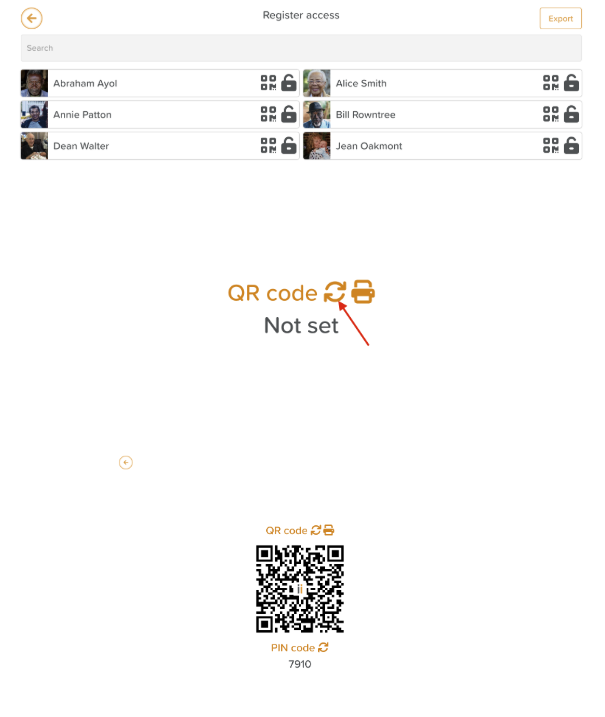
Generate a Code:
Find the individual in the list.
Click the QR code icon or the lock icon next to their name.
Click the circular arrows to generate a new code (or update an existing one).
🔄 Bulk generation is not yet available but is on our product roadmap.
Generate QR code
Generate PIN code
Register
Was this article helpful?
Sorry about that! Care to tell us more?