
How to Invite Connections or Participants to an Activity
StoriiCare allows care teams to invite participants and family Connections to activities directly from the Calendar. Inviting participants can save time when recording attendance, while enabling RSVP gives participants and their family members the ability to respond to activities through the Storii Family App.
If a participant or connection RSVPs for an activity, they will receive a confirmation email and a reminder email on the day!
Inviting Participants to an Activity
Inviting participants to a scheduled activity pre-selects them when it comes time to take attendance.
This is particularly useful for activities with a consistent group of attendees — rather than selecting each person individually, staff only need to deselect anyone who was not present.
To invite participants when scheduling an activity:
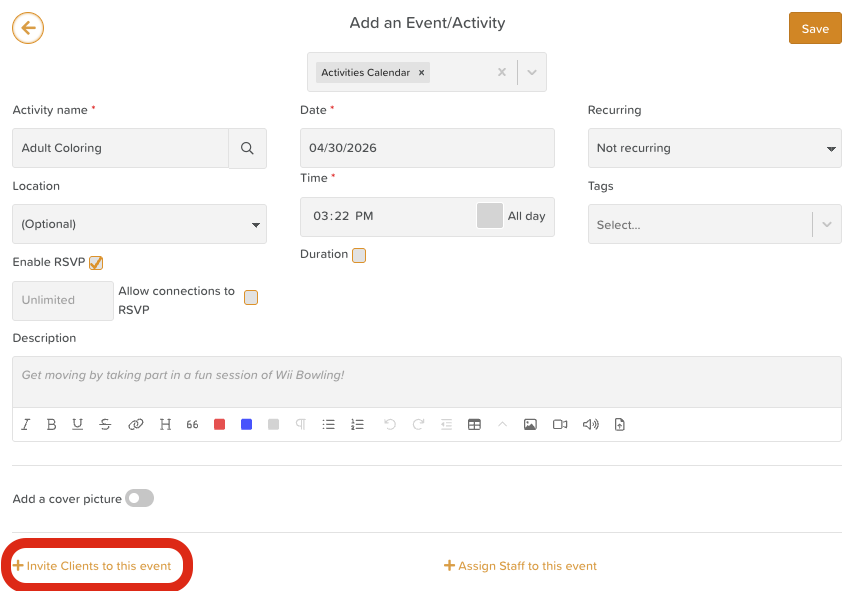
Click + Invite participants to this event
Select participants by clicking on their names
Use the group filter to narrow the list if needed
Use the Select All option to invite all participants at once
Enabling RSVP for Participants
Some care providers invite participants to the Storii Family App and allow them to RSVP for activities in advance. To enable this:
When scheduling the activity, check the box next to Enable RSVP before saving

Inviting Connections to an Activity
Connections are family members or other individuals who have been invited by the center to connect with a participant's profile via the Storii Family App. Connections can view Activity Calendars based on the permissions configured by the center.
For activities open to family attendance — such as open days, holiday parties, or community outings — Connections can be given the option to RSVP. To enable this:
When scheduling the activity, check the box next to Enable RSVP
Check the box next to Allow Connections to RSVP
Optionally, enter a numerical value for the number of available RSVP spots to cap responses — for example, limiting sign-ups for a trip where van capacity is restricted

Viewing RSVPs
When participants or Connections RSVP to an activity through the Storii Family App, the total number of RSVPs will be visible on the activity in the Calendar feature in StoriiCare.

Need More Help?
If you need further assistance, you can reach out to our support team by emailing support@storii.com. Our support team is ready to help you with any questions or issues you may have.