
How to Edit or Delete an Activity Type
Edited
If you need to update the details of an existing activity type or remove one that is no longer needed, this can be done from the Calendar feature.
How to Edit or Delete an Activity Type
Open the Calendar feature
Click the Add button

Select a Calendar from the dropdown menu
Click the Manage Activities button in the top right
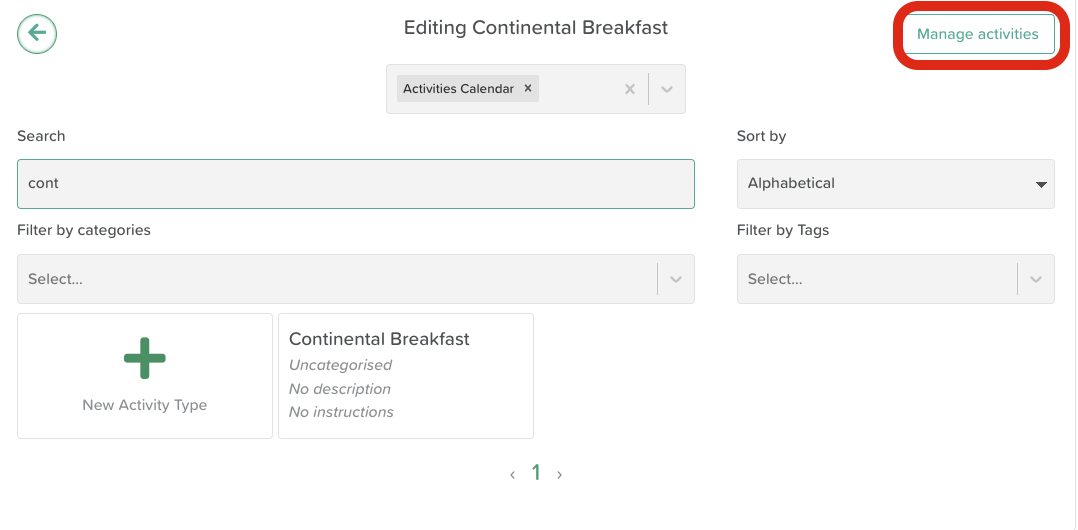
Search for the activity type you want to update or remove
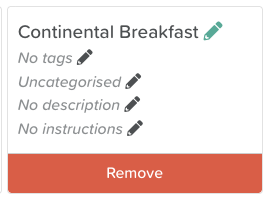
To edit, click the pencil icon to make your changes, then click Save
To delete, click the Remove button to delete that type
Need More Help?
If you need further assistance, you can reach out to our support team by emailing support@storii.com. Our support team is ready to help you with any questions or issues you may have.
Edit Event Type
Edit Activity Type
Managing Activity Types
Managing Event Types
Was this article helpful?
Sorry about that! Care to tell us more?