
How to View a Goal's History: Accessing Past Goal Reviews
Looking for a specific Goal review? StoriiCare makes it simple to access and review a participant’s full history of progress updates, milestone changes, and previously completed reviews. Whether you’re preparing for a care plan meeting, audit, or progress evaluation, you can quickly locate any past review using the built-in Goal History feature.
Follow the steps below to view historical Goal reviews.
Step 1: Open the Participant’s Profile
From the StoriiCare Dashboard, click the Participants tab.
Select the participant whose Goal history you want to view.
Step 2: Go to the Goals Feature
Within the participant’s profile, click on Goals.
Depending on your organization’s terminology, this feature may appear as Outcomes, Objectives, KPIs, Responses, or Actions.
Step 3: Select the Goal
Click on the Goal you want to view.
The Goal will expand so you can see its details, milestones, and current progress.
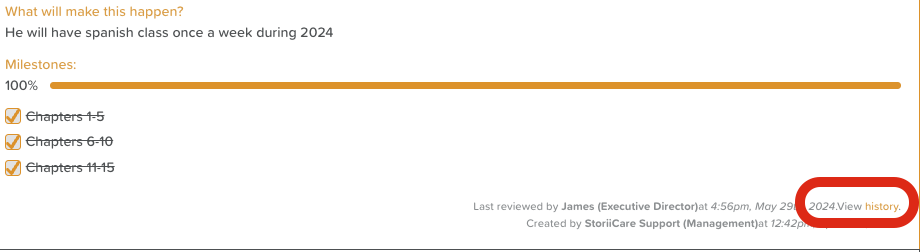
Step 4: Access the Goal History
Scroll to the bottom of the Goal view.
Click on the orange View History text.
This will open the list of all previously completed Goal reviews.
Step 5: Select a Review Date
Use the drop-down menu to choose the review date you want to view.
The full review from that date—including notes, recommendations, and progress details—will be displayed.
You can repeat this process to navigate through all past reviews associated with that Goal.

Best Practices
Use Goal History during care plan meetings to show progress over time.
Review past entries before writing a new review to ensure continuity and accuracy.
Combine Goal History with your Goal Export for complete documentation.
Need More Help?
If you need further assistance, you can reach out to our support team by emailing support@storii.com. Our support team is ready to help you with any questions or issues you may have.