
How to Export Goals
Exporting Goals (also referred to as Outcomes, Objectives, KPIs, Responses, or Actions, depending on your organization’s terminology) allows you to generate reports for reviews, audits, care planning meetings, or progress tracking. StoriiCare makes it easy to download Goal data in a clean, organized format.
Follow the steps below to export Goals for any participant.
Step 1: Open the Participant’s Profile
From your StoriiCare Dashboard, click on the Participants tab.
Select the participant whose goals you wish to export.
Click on the Goals feature within their profile.
Your system may label this section as Outcomes, Objectives, KPIs, Responses, or Actions.
Step 2: Access the Goals Export Tool
Within the Goals feature, look to the top-right corner of the screen.
Click the Export button.
This will open the export configuration window.
You will have several options to customize what appears in your Goals export:
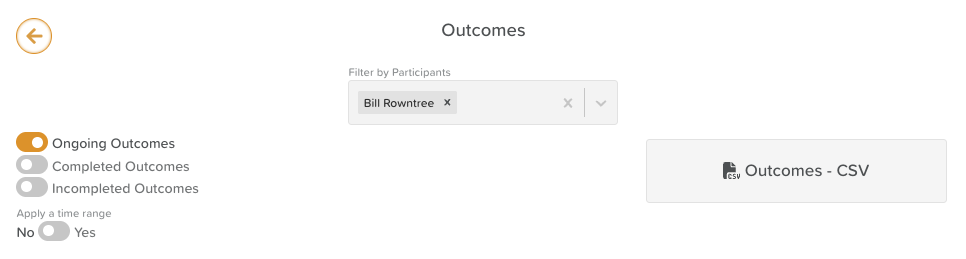
Step 3: Configure & Download Your Export
✔ Make Goal Sections
Use the toggles to select which items to include in the export:
All goals
Only completed goals
Only ongoing goals
Only incomplete goals
or some combination of the above!
✔ Apply a Time Range
If you want to download goals from a specific time period, toggle this setting on to select a "To" and "From" range.
Finally, click the CSV button to download your Goals Export.
⚠️ CSV is currently the only format available for Goals or Outcomes. A PDF download is not yet available, but it is on our development roadmap!
Need More Help?
If you need further assistance, you can reach out to our support team by emailing support@storii.com. Our support team is ready to help you with any questions or issues you may have.