
How to Import Staff Lists in Group Portal
The bulk creation of staff profiles is typically completed by the StoriiCare team during onboarding. However, if your organization is opening a new location or needs to add many staff profiles at once, you can import staff lists in bulk directly through Group Portal.
How to Import Staff Profiles
1. Log In to Group Portal
Go to https://group.storiicare.com and enter your Group Portal login credentials.
2. Select the Location
On the main Group Portal page, locate the location where you want to import staff.
Click the document import icon next to the relevant account.

3. Download the Import Template
Click “Download our template” to obtain the correct file format.
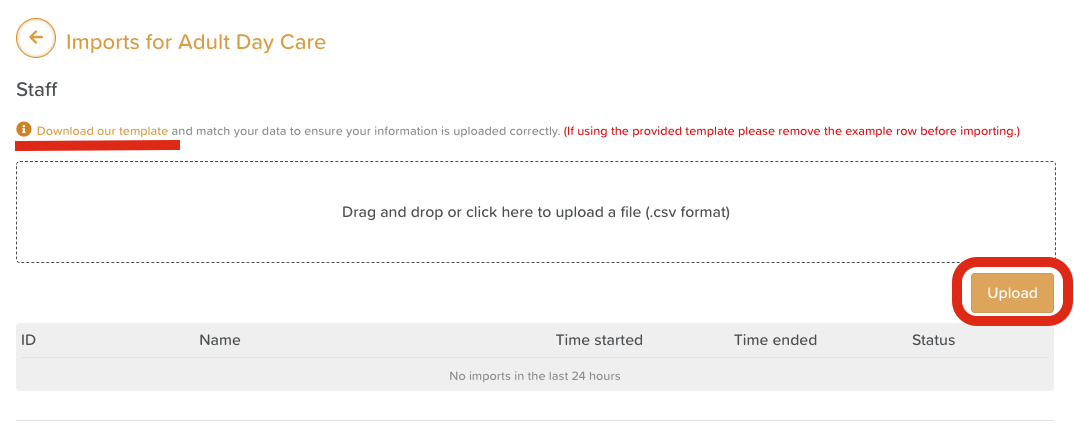
This is important because the import will only work if the columns are in the exact order provided.
✔️ Tip: You do not need to complete every column in the template.
✨ Minimum required fields:
Staff Name
Staff Password (must be at least 8 characters)
All other fields are optional.
4. Complete the Template File
Fill out the spreadsheet with your staff information.
Make sure:
Names are spelled correctly
Passwords meet the minimum character requirement
Data remains in the same column order as the template
5. Upload Your Staff List
Drag and drop your completed file into the upload area, or click to browse and upload manually. Click Upload.
6. Verify Your Upload
After uploading, you can click the house icon (🏠) on the main Group Portal dashboard next to the relevant account to sign in and verify that your staff profiles were created correctly.
🧠 Helpful Notes
This import function is only available through Group Portal, not through individual StoriiCare accounts.
If you run into formatting issues, re-download a fresh copy of the template and try again.
Passwords must be 8 or more characters, or the import will fail for those profiles.
Need More Help?
If you need further assistance, you can reach out to our support team by emailing support@storii.com. Our support team is ready to help you with any questions or issues you may have.