
How to Show Your Birthday on the Birthdays Widget
Staff can choose whether their birthday appears on the Birthdays widget on the StoriiCare dashboard. The setting is off by default, so your birthday is only shown to colleagues if you turn it on.
How to Show Your Birthday
Click your profile photo in the top right-hand corner of the screen.
Click the Settings button on your cover photo.
On the Profile tab, check that your date of birth is filled in under When were you born?
Check the Make my birthday visible in the system box below your date of birth.
Click Save.
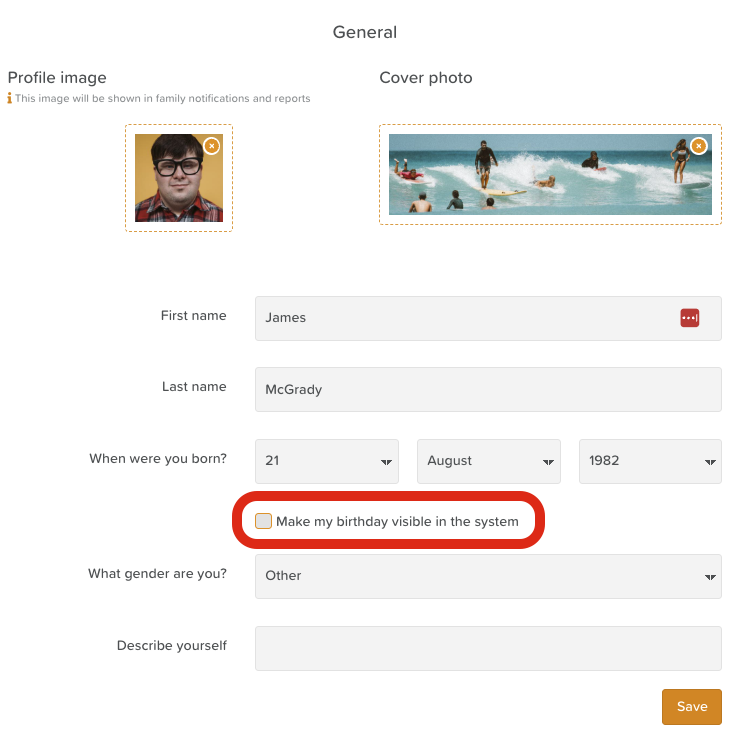
Your birthday will now appear on the Birthdays dashboard widget.
Note: Your birthday will only appear if your date of birth is filled in. If the date fields are blank, enter your date of birth before checking the box.
How to Hide Your Birthday
Click your profile photo in the top right-hand corner of the screen.
Click the Settings button on your cover photo.
On the Profile tab, uncheck the Make my birthday visible in the system box.
Click Save.
Your birthday will no longer appear on the Birthdays widget.
Note: Unchecking the box doesn’t delete your date of birth. It stays saved in your profile settings. It just won’t be shown on the Birthdays widget.
Need More Help?
Please contact us at support@storii.com