
How to Export an eMBS File
Ohio Department of Developmental Disabilities (DODD) billing goes through the state’s eMBS system rather than standard 837 claims, so it can’t be submitted through Stedi. Instead, StoriiCare turns your invoices into an eMBS flat file that you download and upload to eMBS yourself.
This article covers the one-time setup, how to export the file, and what to check before uploading.
📝 This export is only for Ohio providers billing DODD waiver services through eMBS.
Before You Start
Make sure you have:
Invoices generated for the services you’re billing. The export uses the units and rates already on your invoices, so check them first.
Each participant’s Medicaid recipient number in their Face Sheet.
Participants’ names entered exactly as they appear in Ohio’s Medicaid records. eMBS rejects claims where the name doesn’t match.
Your DODD contract number and the service codes you bill, such as ADS or ADF.
Step 1: Set Up Your eMBS Export Settings
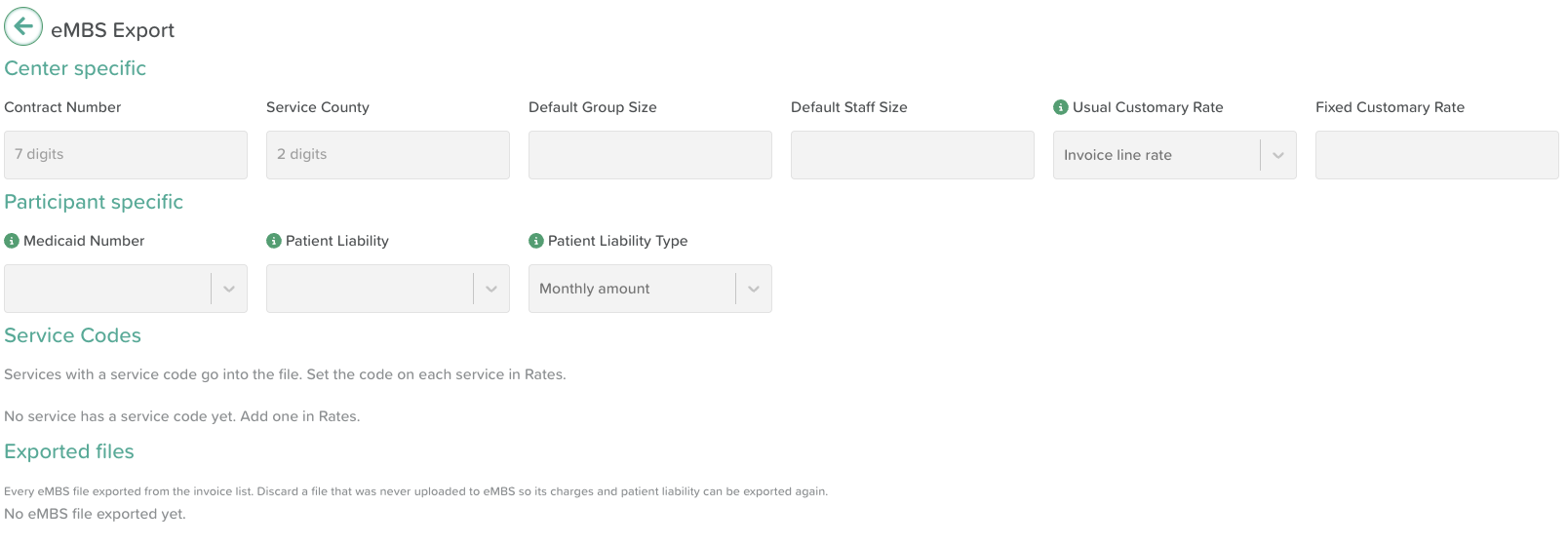
You only need to do this once, unless your details change.
Go to: Billing > Settings > Exports > eMBS Export
Complete the following center specific settings:
Setting | What to enter |
|---|---|
Contract number | Your DODD provider contract number |
Service County | The service county code |
Rate to service code mapping | Match each StoriiCare rate to its eMBS service code. For example, your Adult Day Support Full Day rate maps to ADS. |
Default group size | The group size reported on each line |
Default staff size | The staff size reported on each line |
Usual Customary Rate | Where StoriiCare should take your usual and customary rate from: Invoice line rate or Fixed amount |
Click Save. StoriiCare checks your entries and will let you know if anything is in the wrong format.
⚠️ Only rates mapped to a service code are included in the export. Line items for unmapped rates are skipped.
Complete the following Participant specific settings:
Medicaid Number | Select/map to the Medicaid ID field in your Face Sheet. |
Patient Liability | (Optional) Select/map to the Patient Liability field in your Face Sheet. It is reported in fields 11 and 12 of the M-file. |
Patient Liability Type | Monthly amount: the total for the month is taken from the first lines until it runs out. |
⚠️ Services with a service code go into the file. Set the code on each service in Rates.
Step 2: Export the File
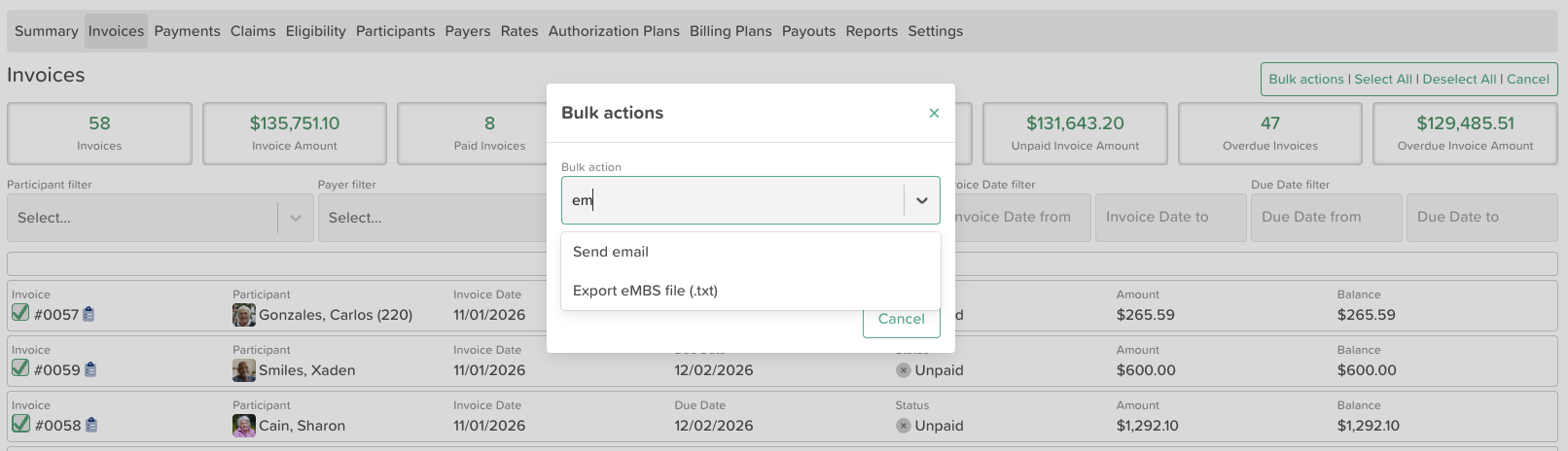
Go to Billing and open your Invoices list.
Click Multi-Select to check the invoices you want to bill.
Open Bulk actions and choose Export eMBS file (.txt).
Review any skipped lines (see below), then download the file.
StoriiCare creates one line for each service date on each mapped invoice line item, using the units and rates from the invoice.
⚠️ If required settings are missing, the export won’t run. StoriiCare will tell you what needs to be completed in Step 1.
Skipped Lines
If any lines can’t be included, StoriiCare lists them along with the reason, for example an unmapped rate or a missing Medicaid number. Fix the issue and export again, or bill those lines separately.
Step 3: Upload the File to eMBS
Log in to eMBS.
Upload the .txt file you downloaded.
Check your Billed Claims report in eMBS to confirm the claims went through.
⚠️ Don’t rename the file. eMBS has strict filename rules, and a filename can never be used twice, even if an upload fails. StoriiCare names every file correctly and never reuses a name. If you need to try again, export a new file from StoriiCare.
Common eMBS Rejections
eMBS checks each claim against state records. Claims are commonly rejected when:
The service date is outside the participant’s authorization in PAWS. Every claim must be authorized in PAWS by the county board first.
The participant’s name doesn’t match the Medicaid recipient file.
Too many units are billed in one day. That means more than 1 unit for daily codes, or more than 96 units for 15-minute codes.
If claims are rejected, check eMBS’s error reports, correct the issue in StoriiCare or with your county board, and export a new file.
Good to Know
StoriiCare doesn’t check PAWS. Confirm authorizations with your county board before billing.
Daily and 15-minute units can’t be mixed for the same participant on the same day. Make sure each invoice uses the right rate for the service delivered.
Payments and remittance happen in eMBS. Record payments in StoriiCare as usual once you receive them.
Need More Help?
If you need further assistance, email our support team at support@storii.com.