
How to Edit an Invoice
StoriiCare allows you to edit invoices both before and after they have been generated. This article explains both workflows and covers the fields available to edit.
Note: The ability to edit invoices depends on your StoriiCare permissions. Additionally, invoices cannot be edited once a payment has been applied, even if the payment is partial.
Editing an Invoice Before Generating
From the StoriiCare dashboard, navigate to Billing and select the Billing Plans tab.
Locate the relevant billing plan and click Preview & Generate Invoices.
Use the participant filter to locate the invoice you want to edit.
Click Edit Invoice.

What You Can Edit
Once in the edit view, the following fields are available:
Participant — the participant the invoice is assigned to
Invoice # — the invoice number
Invoice Date and Due Date
Charges — for each line item, you can update the Category, Description, Dates, Notes, Quantity, Rate, and Tax
Discounts — toggle discounts on or off for a charge, update the Discount Category and Discount amount, or click Add a new Discount to apply an additional discount
Assigned Payer(s) — update the payer for each charge, or click Add another Payer to assign an additional payer
To remove a line item, discount, or payer, click the red trash bin icon on the right-hand side of the relevant row
Changes apply automatically as you make them — there is no need to save before navigating away.
When you are finished, click Back to return to the preview screen and proceed with generating the invoice.
Editing an Invoice After Generating
From the StoriiCare dashboard, navigate to Billing and select the Invoices tab.
Locate the relevant invoice and click the three-dot menu (...) next to it.
Click Edit.

Click the arrow next to the total balance to expand the charges.
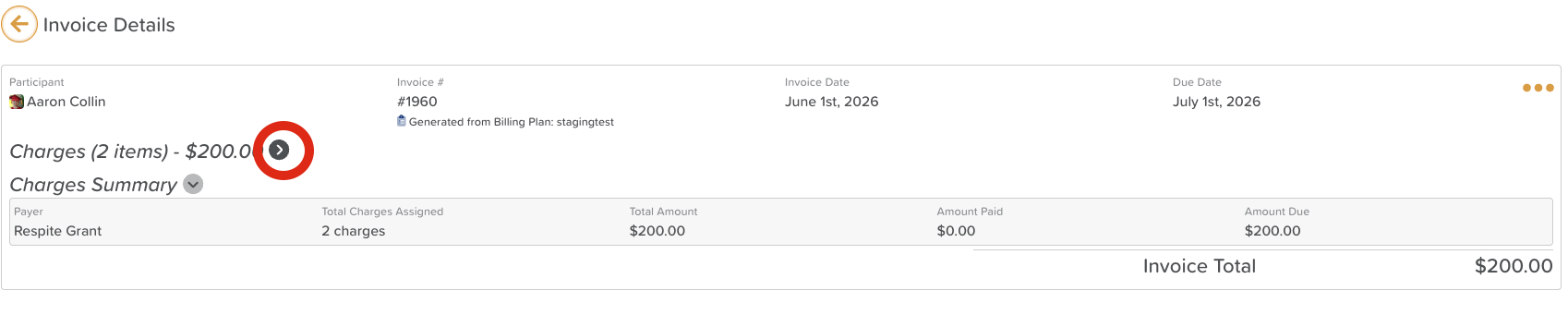
Make edits as needed using the same fields described above.
When you are finished, click Save at the bottom of the screen.
Need More Help?
Contact our support team at support@storii.com.