
Vital Signs Reporting
Edited
How to Download Vital Signs Reports
Vital Signs data can be exported for audits, reviews, or sharing with external professionals.
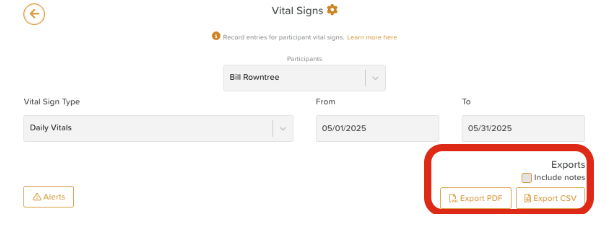
Go to Vital Signs (terminology may differ on your account).
Use the dropdown menus to apply filters such as:
Participant
Vital Sign Type or Group
Date range
Including notes
Choose your export format:
PDF for printing or sharing
CSV for analysis or archiving
Check the box that says Include notes if you'd like any notes staff have recorded about observation entries to be included in your report.
Need More Help?
If you need further assistance, you can reach out to our support team by emailing support@storii.com. Our support team is ready to help you with any questions or issues you may have.
Observations
Measurements
Was this article helpful?
Sorry about that! Care to tell us more?