
How to Record Multiple Vital Signs at Once
Rather than clicking into each Vital Sign chart, users can group the Vital Signs they record on a daily, weekly, or monthly basis and enter all data points at once. This guide will walk you through how to set up your custom Vital Signs Group.
How to Set Up a Vital Signs Group
Open up the Vital Signs feature (terminology may differ on your account)
Click on the settings wheel icon at the top of the page

Scroll down to the Groups section
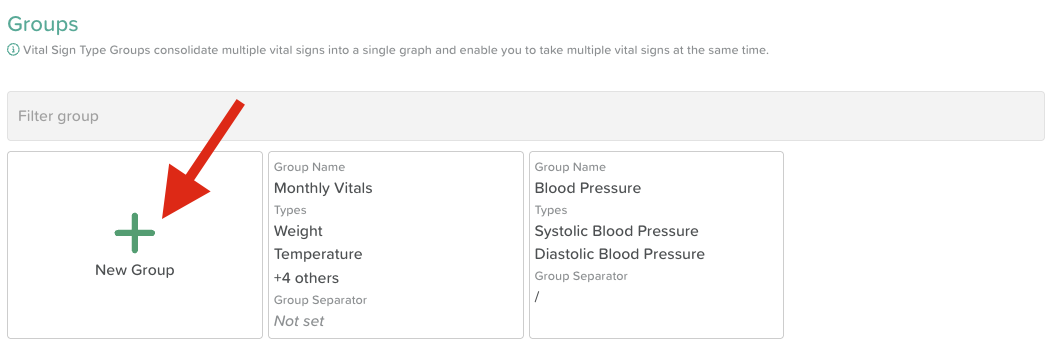
Click on +New Group
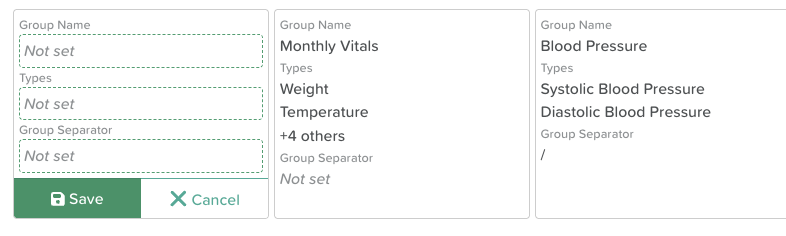
Add a Group Name (e.g. Monthly Vitals)
Select Types — choose which Vital Sign types you want included in your group (e.g. Temperature, Weight, Systolic Blood Pressure, Diastolic Blood Pressure, Heart Rate)
(Optional — only needed for Blood Pressure) Select a Group Separator
Click Save
How to Record a Group of Vital Signs
Open up the Vital Signs feature (terminology may differ on your account)
Select a participant from the dropdown list
Click on the Vital Sign Type dropdown menu, scroll to the top where Groups are listed
Select your Group
Click Add entry
Fill in each Vital Sign
Click Save
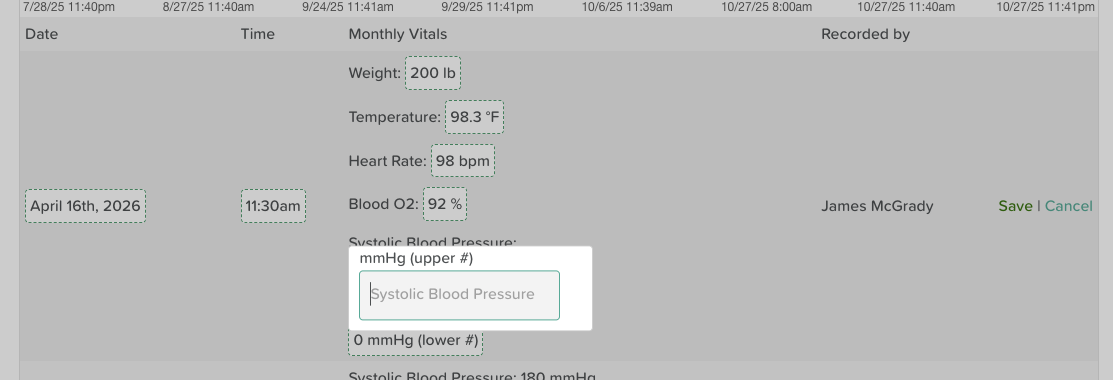
All Vital Signs recorded will appear as entries not only in the Group chart, but also on the individual Vital Signs type charts.
Need More Help?
If you need further assistance, you can reach out to our support team by emailing support@storii.com. Our support team is ready to help you with any questions or issues you may have.