
How to Download 835 Files
The 835 Electronic Remittance Advice (ERA) provides detailed information about processed claims, including payment amounts, adjustments, and payer decisions. StoriiCare allows users to download the 835 ERA as a PDF for easy review and recordkeeping.
Follow the steps below to download an 835 file.
How to Download an 835 ERA
From the Dashboard, go to Billing.
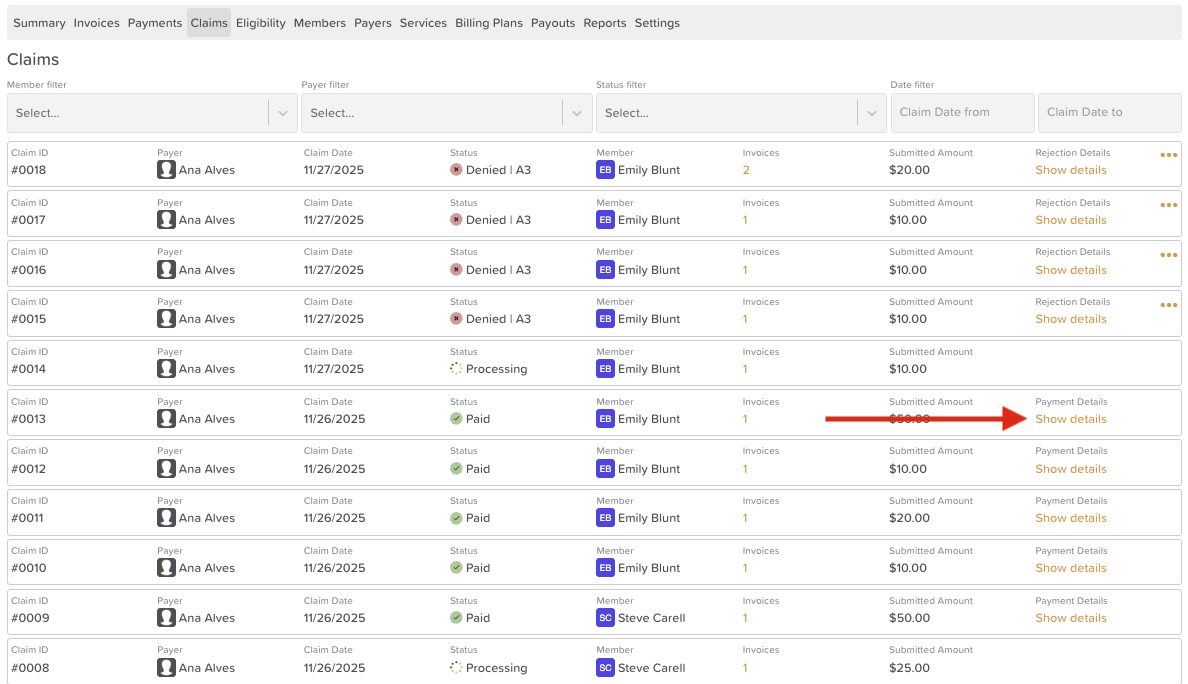
Click on the Claims tab.
Select the relevant claim from the list.
Under the Payment Details section, click Show details.
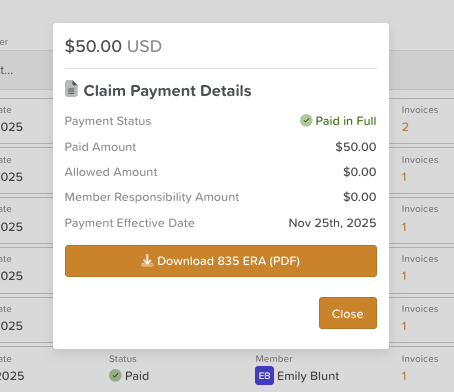
A smaller window will open with additional payment information.
Click Download 835 ERA (PDF).
The 835 remittance advice will download to your device as a PDF file.
What the 835 ERA Includes
The downloaded ERA provides a breakdown of the claim payment, including:
Payment details from the payer
Claim adjustments or denials
Paid amounts and allowed amounts
Relevant claim reference information
This file can be used for reconciliation, billing records, and auditing purposes.
Need More Help?
If you need further assistance, you can reach out to our support team by emailing support@storii.com. Our support team is ready to help you with any questions or issues you may have.